
Connecting participants
Each pilot must be connected to the Retrieve chat bot. It allows :
- to announce a safe landing
- to receive an announcement from the organizer
- to communicate between the pilot and the organiser
Register in the mobile application
- Install the Telegram application and open it (Android, iOS, Windows, macOS, Linux)
- Click on the search icon
- Search for Flymaster Retrieve
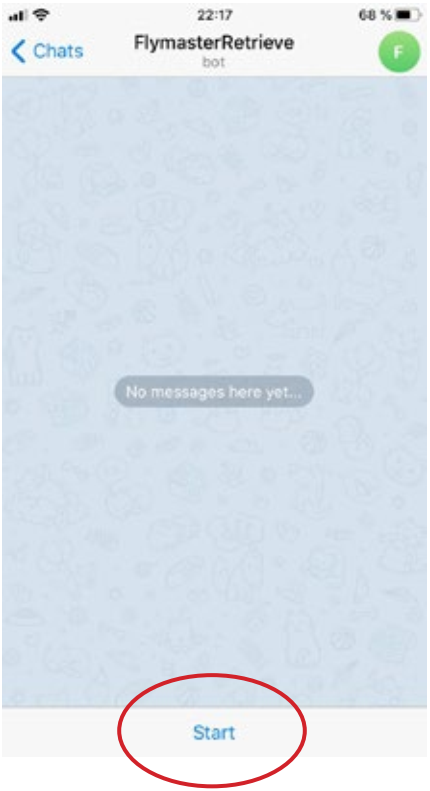
- Open the chat bot and click START
Register in the competition
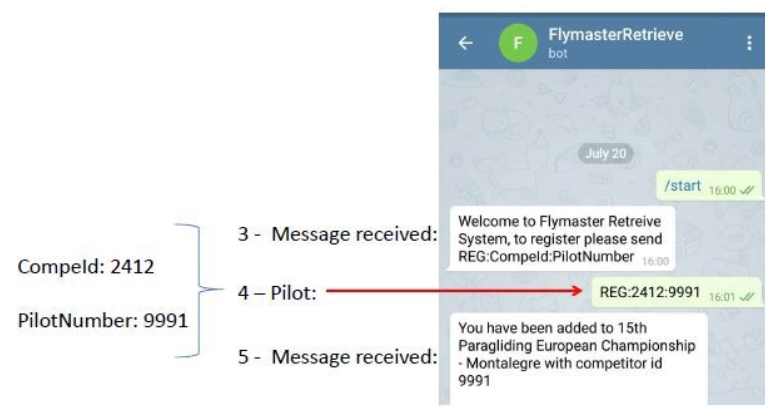
In the chat bot, type REG:XXXX:CompID and send. The login details will be sent to you by email.
Use
During the competition, the proper functioning of the application depends on the actions of each participant, who are obliged to use special commands related to specific cases. The following instructions should be printed and kept with you. They will also be explained during the briefing.
Command for pilots in FlymasterRetrieve Telegram
- REG:XXXX:PilotNumber Register for a competition
- SAFE announce a safe landing
- DNF announce a no-fly day
- ORG:your message… send a message to the organiser
Emergency
The main constraint of the participants is to announce SAFE within 10 minutes after a safe landing. In certain situations such as automatic landing detection, a reminder is sent to the pilot.